
- 2024-05-01
- ELSAYED ELISSAWI
- (0)
- Uncategorized
Leveraging Google Ads for Business Growth
Feeling stuck with flat website traffic? Want to squeeze more juice out of your marketing budget? Look no further than Google Ads.
In this guide, we’ll break down everything you need to know about Google Ads in 2024. We’ll cover campaign types, keywords, tactics, and winning strategies to help you scale your business.
Here’s why Google Ads is a game-changer:
- Massive Reach: Google processes trillions of searches every year. With Google Ads, you can tap into this giant audience and put your products right in front of potential customers.
- Targeted Marketing: No more spraying ads everywhere. Google Ads lets you target the exact people you want to reach, based on demographics, interests, and even location. Brick-and-mortar store? Attract local customers. E-commerce business? Find the perfect online shoppers.
- Measurable Results: Unlike some marketing tactics, Google Ads gives you clear data on how your campaigns are performing. You can see exactly what’s working and what’s not, so you can optimize your spending for maximum impact.
- Boost Any Goal: Want more brand awareness? Check. Need a surge in website traffic? Done. Google Ads can be customized to fit your specific business goals, from driving sales to growing your email list.
This guide will equip you with the knowledge to unlock the power of Google Ads and take your business to the next level.

Hire the best advertising marketers we have endorsed.
Are you ready to take your marketing game to the next level? Join our team of elite marketers at ad.wrstrend and be part of something extraordinary! Join us today and let’s make marketing magic together! 🚀
What are Google Ads?
Think of Google Ads as a giant online auction for ad space. You create targeted ads for your products or services, then set a budget for how much you’re willing to pay each time someone clicks on your ad. The higher your bid and the more relevant your ad is to the search query, the more likely it is to appear at the top of search results or on other relevant websites.
Here’s the beauty of Google Ads: you only pay when someone clicks on your ad, not just for showing it. This makes it a cost-effective way to reach potential customers who are already interested in what you offer.
Beyond Search Ads:
While Google’s search engine is a powerhouse, Ads isn’t limited to just search results. You can choose from various ad formats to reach your target audience across different platforms:
- Search Ads: These appear at the top or bottom of search results when people search for terms related to your business.
- YouTube Ads: Reach viewers before, during, or after videos on YouTube, the world’s second-largest search engine.
- Display Ads: Place eye-catching banner ads on millions of websites across the internet.
- Shopping Ads: Showcase your products directly on Google Shopping and search results, complete with product images and prices.
Tailored for Every Business
No matter if you’re a local bakery down the street or a global e-commerce giant, Google Ads can be customized to fit your needs.
- Brick-and-Mortar Stores: Target potential customers in your area searching for products or services you offer. Attract them with special offers or highlight your convenient location.
- E-commerce Businesses: Reach a global audience actively searching for what you sell. Get laser-focused by targeting demographics, interests, and even past buying behaviors.
By leveraging the right combination of ad formats and targeting options, Google Ads can become a powerful tool to drive traffic to your website, generate leads, and ultimately boost your sales.
Do Google Ads work?
Absolutely, using Google Ads is worth it. They provide access to a vast audience that you can target based on numerous data points. You can tailor your ads to reach every type of customer, no matter where they are in the customer journey, and you can see results very quickly.
In the short term, search campaigns will drive significantly more traffic to your business than SEO. While SEO is essential for long-term growth and maintaining an online presence, paid ads can quickly give you a boost and generate a substantial amount of traffic in a short period.
Why advertise on Google?
68% of all customer purchases begin with an online search, and 92% of those searches happen on Google. Running Google Ads with content relevant to the search results can give you an advantage in your market.
Paid campaigns also enhance your organic search results and increase your visibility on the search results page. If you’re in a competitive industry, relying solely on organic traffic means you’ll rank lower than your competitors, even if you offer top-quality products.
It’s crucial to include Google Ads in your paid advertising strategy, along with Instagram and Facebook ads. Experiment with different campaign types and ad targeting to find what works best for you.
How does Google Ads work?
Google Ads operates on a bidding system where you bid on specific keywords related to your business, based on how much you’re willing to pay per click. If you win the bid, your ad will appear above the organic search results when users search for those keywords on Google.
While the basic principles of Google Ads are straightforward, there are nuances that you must pay attention to if you want to optimize your campaigns effectively.
Here they are:
AdRank and Quality Score:
Google evaluates your landing page based on several factors, including your Quality Score, user engagement, loading speed, and the presence of relevant keywords.
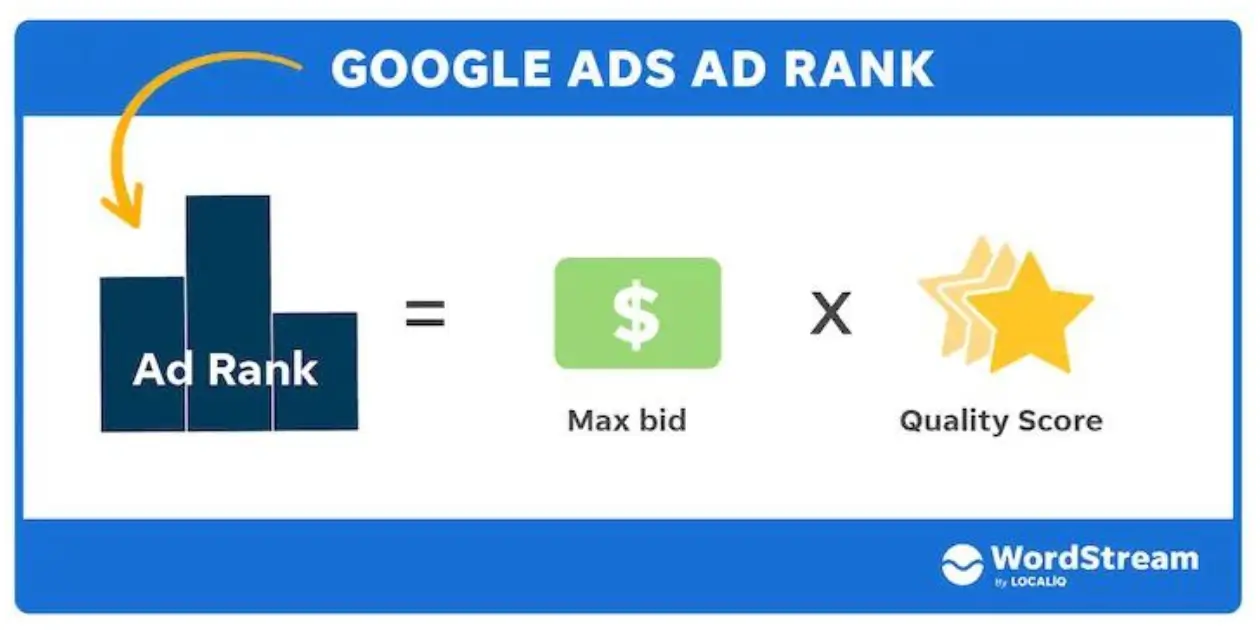
Quality Score is a measure of your ad’s relevance and quality. It considers aspects such as your ad’s click-through rate and how well your ad aligns with the searcher’s intent
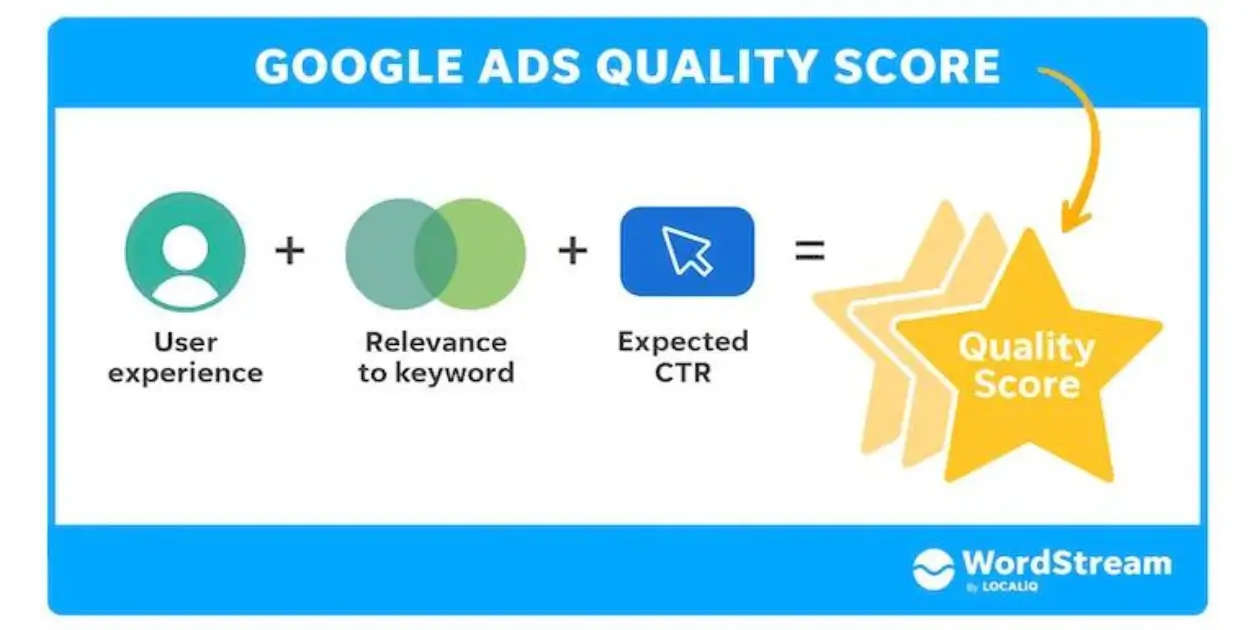
To enhance your click-through rate, consider these elements:
- The user’s experience on the landing page.
- The relevance of your keyword.
- Your call to action (CTA) and the effectiveness of your ad copy.
Your Quality Score (QS) and bid amount collectively determine your AdRank. Therefore, improving your QS can lead to a better click-through rate, which, in turn, can enhance your ad’s ranking.
Pro tip: Looking to boost your Google Rank? Consider engaging with one of our top Google Ads specialists.
Location:
Location refers to the geographical area where Google users will see your ads. This is a particularly beneficial feature as it allows you to focus your advertising efforts on a specific audience based on their location. By targeting ads geographically, you can ensure that they are seen by users who are most likely to be interested in your products or services, thereby increasing the effectiveness of your campaigns.
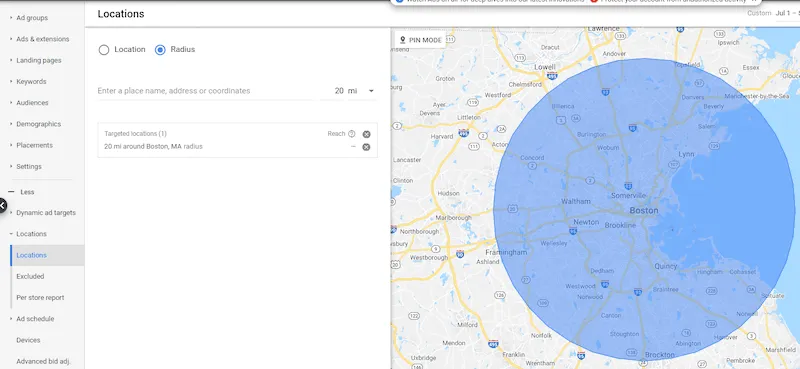
Localizing Your Store’s Ads
For Brick-and-Mortar Stores: Limit ad visibility to a manageable vicinity around your store by utilizing specific zip codes. This local targeting ensures that your ads reach customers who can physically visit your store.
For eCommerce Businesses: Display your ads globally, as eCommerce platforms have the advantage of reaching customers worldwide with minimal restrictions.
Keywords: The Heart of Google Ads
Choosing the Right Keywords: Selecting appropriate keywords is crucial for reaching your target audience. Invest in thorough keyword research to identify terms that align with your potential customers’ search intent.
Refining Keywords: Continuously refine your keywords to better match search intent. This process may take time, but proactive optimization will yield the right set of keywords.
Match Types: Tailoring Your Reach
Broad Match: The default option that uses any word from your keyword phrase in any order, ideal for broad reach. Modified Broad Match: Locks in a specific word within your keyword phrase, denoted with a ‘+’ sign, ensuring its presence in all matched queries. Phrase Match: Includes your keyword phrase in the exact order, with potential additional words before or after. Exact Match: The most precise option, displaying your ad only for searches that match your keyword phrase exactly.
Adaptation Strategy: Start with an exact match and gradually expand to other types as you understand your audience and refine your campaign goals. Be agile and ready to adapt.
Crafting Impactful Headlines and Descriptions
The Importance of Engaging Copy: An engaging headline and description are essential. They should resonate with your keyword, address user concerns, and convey key information succinctly to capture attention and drive action.
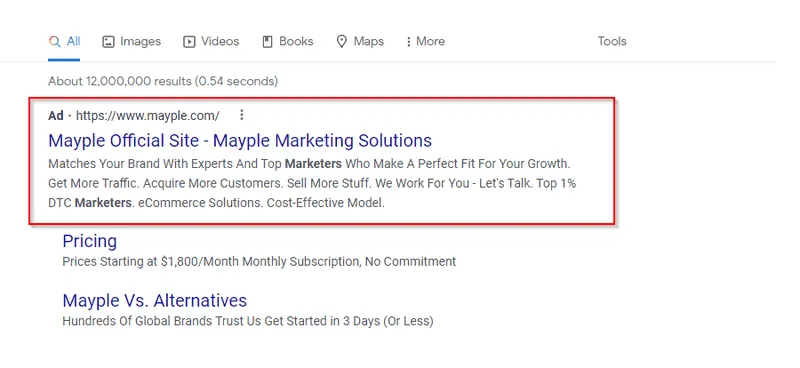
Enhancing Your Google Ads with Strategic Headlines and Descriptions
Incorporating Keywords in Headlines: Always include the keyword in the headline to ensure immediate relevance to the searcher’s query. This strategic placement signals to potential customers that your ad is precisely what they’re searching for.
Crafting Clear and Concise Descriptions: The description should directly address the searcher’s needs or questions in a straightforward manner. Aim for clarity and brevity, avoiding overly sensational language that might detract from the ad’s credibility.
The Impact of Engaging Ad Copy: An engaging headline paired with a well-crafted description can significantly improve your ad’s performance. This combination can capture attention and drive engagement, potentially outperforming competitors’ ads, even with a lower bid. It’s about making a strong impression that encourages click-throughs and conversions.
By following these tips, you can create Google Ads that not only attract attention but also deliver results by resonating with your target audience. Remember, the goal is to connect with searchers genuinely looking for what you offer, leading to better ad performance and higher conversion rates.
Maximizing Ad Impact with Ad Extensions
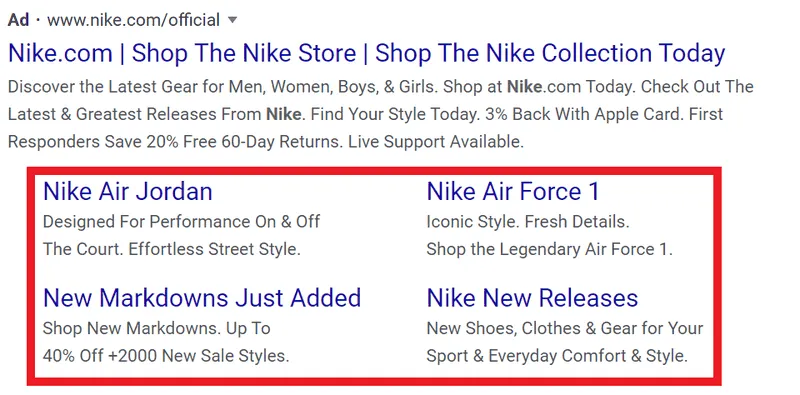
Ad Extensions: These are powerful tools that enhance your ads by providing extra information, making them more appealing and informative compared to competitors’ ads. Here are the types you can utilize:
- Sitelink Extensions: Expand your ad with additional links. This allows customers to navigate directly to specific areas of your site, like product categories or deals, streamlining their experience.
- Location Extensions: Show your business address, letting local customers know how close they are to your physical store.
- Offer Extensions: Highlight special deals or promotions you’re currently offering to entice clicks.
- Call Extensions: Include a phone number for easy contact, which can be especially effective for local businesses.
- App Extensions: If you have a mobile app, this extension can link directly to the app download page, encouraging users to engage with your app.
By strategically using these extensions, you can significantly improve the performance of your Google Ads, driving higher engagement and conversion rates. Remember to align the extensions with your campaign goals and target audience for the best results.assistant|)
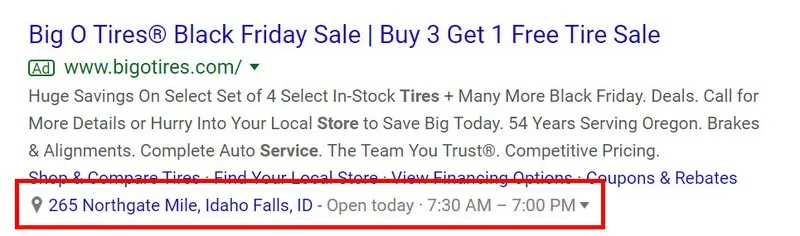
Location Extension Optimization: Utilizing a location extension can significantly enhance your ad’s relevance, especially for search queries that include “near me.” This extension enables you to incorporate your business address and phone number directly into your ad, making it easier for potential customers to find your physical location or contact you with just one click.
By aligning your ad with local search intent, you can attract customers who are actively seeking services or products in their vicinity, thereby increasing the likelihood of them visiting your store or making a direct inquiry.assistant|)
Utilizing Offer Extensions to Boost Ad Appeal
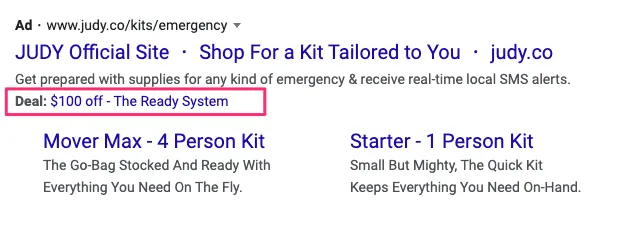
Highlighting Deals with Offer Extensions: Offer extensions are a fantastic way to showcase special promotions within your ads. Deals and discounts have a magnetic appeal, drawing in consumers by presenting immediate value. By emphasizing these offers, your ad becomes more compelling, guiding potential customers directly to the featured products or services.
Leveraging these extensions can not only improve click-through rates but also enhance the overall effectiveness of your campaigns by directly connecting searchers with your most attractive offers. It’s a strategic way to differentiate your ads and capture the interest of deal-seeking customers.assistant|)
Call Extensions: Connecting Instantly with Customers
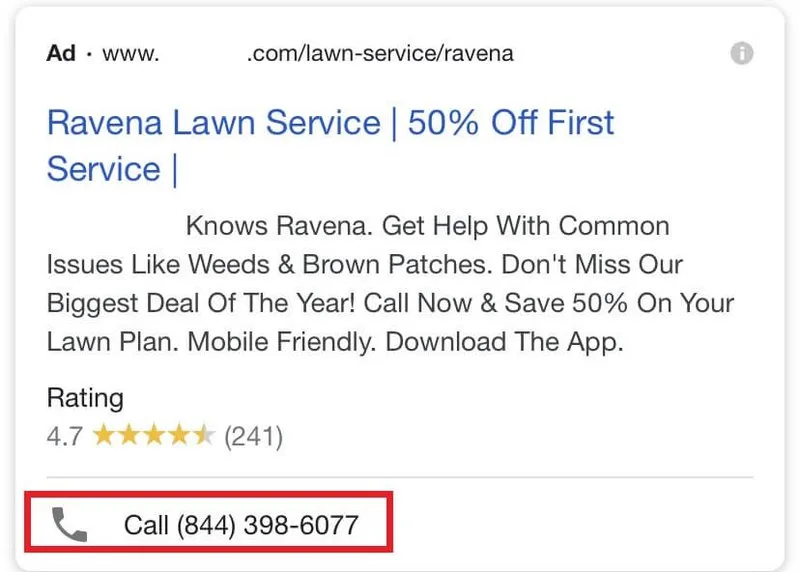
Boosting Calls with Call Extensions: When your objective is to increase customer calls, call extensions can be a game-changer. These extensions enrich your ads with your phone number, providing a direct line for potential customers to reach you. The immediate accessibility offered by call extensions can significantly enhance customer interaction, encouraging them to make that all-important call to your business.
By integrating call extensions, you not only make it convenient for customers to contact you but also potentially increase the conversion rate as customers appreciate the ease of communication. This feature is particularly beneficial for businesses where quick customer service and direct contact are essential.assistant|)
Streamlining App Downloads with App Extensions
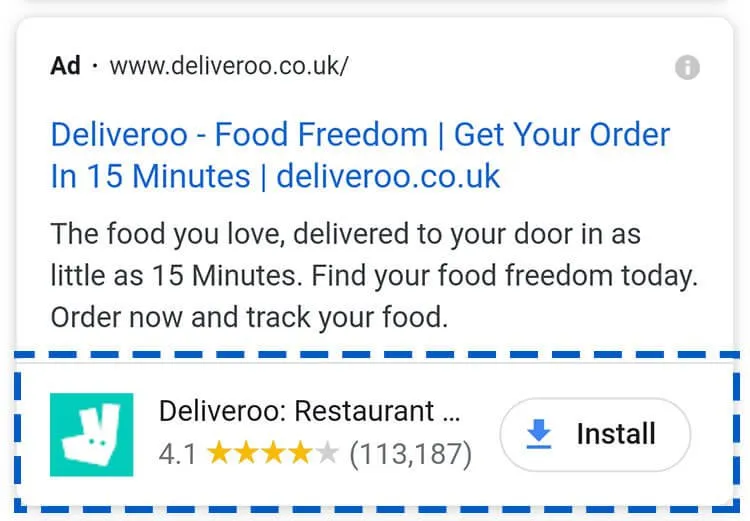
Facilitating Direct Downloads: App extensions are a boon for mobile-centric businesses, providing users with a direct link to download your app. This bypasses the need to navigate app stores, offering a seamless experience for users. For advertisers, it simplifies the process of converting interest into action, as potential customers can quickly and effortlessly install your app.
By incorporating app extensions into your ads, you’re removing barriers, making it more likely that users will engage with your app. This convenience can lead to higher download rates and increased user engagement, benefiting both users and advertisers alike.assistant|)
Google Ads Retargeting: Capturing Missed Opportunities
Retargeting for Conversions: Retargeting, or remarketing, is a powerful strategy to increase conversions. It involves tracking users who have previously interacted with your ads and targeting them again. This repeated exposure can be the nudge a potential customer needs to make a purchase.
Why Retargeting Matters: It’s common for customers to require multiple encounters with an ad before deciding to convert. Retargeting ensures your brand stays at the forefront of their minds, increasing the likelihood of conversion upon subsequent interactions.
Expert Assistance: If you’re looking to maximize the effectiveness of your retargeting campaigns, consider consulting with a retargeting expert. They can offer specialized insights and strategies to refine your approach and boost your ad performance.assistant|)
Hire the best advertising marketers we have endorsed.
Are you ready to take your marketing game to the next level? Join our team of elite marketers at ad.wrstrend and be part of something extraordinary! Join us today and let’s make marketing magic together! 🚀
Google Ads terms you should know
If you want to use Google Ads you should also get acquainted with the lingo. While some of these phrases probably sound familiar, make sure that you understand what they all refer to in the context of Google advertising. Otherwise, it might be difficult to utilize the full potential of the platform.
AdRank
AdRank refers to the value that determines where your ad appears in comparison to other ads, and whether it appears at all.
Quality score
As we’ve mentioned previously, Quality Score is a metric that shows you how good your ad is compared to your competitors’ ads. You’ll see it on a scale from 1–10. A greater QS indicates that your ad is relevant and that your Google Ads landing page provides a good user experience.
Bidding
Every time Google Ads has a free space for a new ad, it will start an auction. Business owners who want to advertise bid in those auctions to get the advertising spot. There are four main bidding strategies:
- Maximize clicks – if your main goal is to drive more traffic to your website or to sell products.
- Maximize impressions or views – if your goal is increasing brand visibility, you should focus on impressions. This means that you won’t pay for each click you get, but rather for the number of impressions. In simpler terms, you’ll pay for every 1,000 times your ad appears to someone.
- Maximize conversions – If your main goal is increasing the number of conversions you get, you may choose to pay for each conversion you get from a Google ad, no matter what kind of conversion it is. If you want to choose this option, your conversion tracking must be turned on, so this focus is better suited for intermediate and advanced users.
- Maximize views – similar to impressions, but more focused on video ads. Bid on video views when you want to create captivating videos. This will also allow you to track how your ideal customers engage with your video, thus letting you tweak your video ads and improve them.
Campaign type
Google Ads allows you to choose between a few campaign types. These choices give you a lot of flexibility and allow you to precisely tailor your campaigns to your needs. The campaign types you can choose from are:
- Google Search ads
- Google display ads
- Google Discovery Ads
- Video ad campaigns
- Google Shopping campaigns
Let’s examine each campaign type in detail and see how and when you should use them.
Google search ads
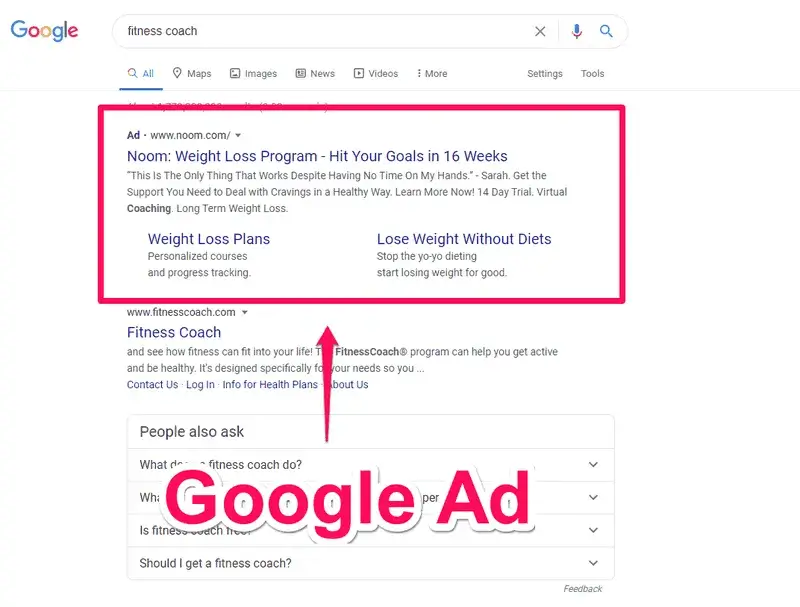
Search ads They look very similar to the organic results on the first page of Google, except for a small pin that shows it’s an ad.
These ads can work for a wide variety of purposes, especially if the goal is to attract more people to your website.
Google display ads
Display ads are the ads Google displays on online publisher websites that are a part of the Google Display Network. This is something that benefits both website owners and advertisers. The website owners earn money and the advertisers get to show their ads to even wider audiences and/or retarget their existing visitors.
Video ad campaigns
Video ads mostly end up on YouTube, since it’s also a search engine and is owned by Google. While they may be annoying while you’re trying to watch a YouTube video, they can be very useful when you’re trying to advertise a product.
App ad campaigns
App campaigns get your app to your target audience and invite it to install the app or take a certain action in it. A great thing about this type of campaign is that you don’t have to do much. When you win the bid, Google does the rest of the job for you, so you can be sure your app will find the right audience.
Google Shopping campaigns
Shopping campaigns are an amazing choice if you’re an eCommerce brand and want to advertise your products. These ads show your products visually and place them above the organic search results.
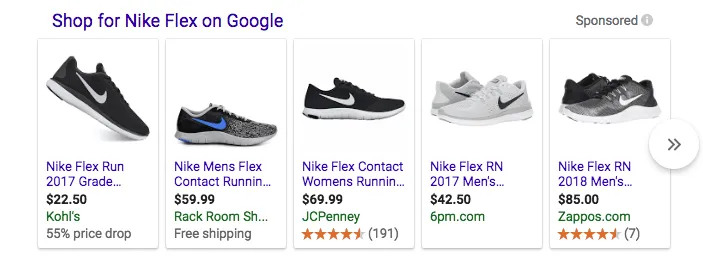
These ads typically show a picture of your product, the price, and its rating. They provide a great way for customers to quickly access most of the information they need to make their purchase decision. You can edit all that information in your Google Merchant Center account. On the other hand, they do get more competitive with a lot of brands competing on price to win the bid.
Display Network
Google Display Network, known simply as GDN is a network of sites that cooperate with Google and allow the company to post ads for a fee. These can be textual ads or image ads, and they appear next to relevant keywords. The Display Network is often used for app and native ads, but can be used for all ad types.
Extensions
Extensions allow you to add more information to your ads to further entice the searcher to click on them. To make matters better for the advertiser, these extensions don’t come at an extra cost. As we’ve discussed in detail above, these extensions fall under a few categories:
- Location
- Sitelink
- Call
- App
- Offer
Keywords
Keywords are words and phrases that Google users search for when they have a query. When you use Google Ads, you have to bid for a keyword so Google will display your ad when someone searches for that keyword.
There are also negative keywords. These are keywords that you don’t want to rank for. Google will pull your bid from these keywords so you don’t waste your budget on them.
Click-through rate (CTR)
The click-through rate refers to the number of clicks you get on an ad compared to the total number of views on it. If you have a high CTR, it means that you’ve been able to target relevant keywords and create a high-quality ad that matches the search intent.
Conversion rate (CVR)
Your conversion rate is the percentage of people who take the desired action out of all the people who interact with your ad. For instance, if your ad is trying to sell something and it has 1,000 total interactions with 50 purchases, your conversion rate is 5%.
PPC
PPC or pay-per-click ads refer to the type of bidding where you pay for each click on your ad. This is the most common type of online advertising as it’s cost-effective and simple to use.
How to get started with Google Ads
Now that we’ve covered the basics, you’re probably eager to start your own campaign and get new customers. Let’s take a look at the steps you need to take to get started with Google Ads.
1. Set up your Google Ads account
The first step towards a successful campaign on Google Ads is creating an account. You’ll have to go to their homepage and click on Start Now. Google will give you a choice between using an existing Google account or creating a new one.
Once you sign in, you’ll go to a page where you’ll enter your business name and website. The people who click on the ad will end up on that website.
2. Select your advertising goal
When your account is ready, you’ll get to pick a marketing objective, depending on what you want to achieve with your campaign. You can choose between a few goals.
- Get more calls
- Get more website sales or sign-ups
- Get more visits to your physical location
- Get more views and engagement on YouTube
3. Create your ad
Now it’s time to create the ad, and that’s where the bulk of the work is. This is the most significant and time-consuming part of the process, but it is crucial for the success of your campaign.
Google gives you suggestions on what to write, but you’ll have to take some time to craft a truly captivating ad text.
Hire the best advertising marketers we have endorsed.
Are you ready to take your marketing game to the next level? Join our team of elite marketers at ad.wrstrend and be part of something extraordinary! Join us today and let’s make marketing magic together! 🚀
4. Add keywords
Researching keywords and selecting the most appropriate ones is the next big step. Your keywords can make or break your campaign.
Use Google Ads Keyword Tool as well as external keywords tools to pick the best keywords for your campaign. Take some time to research and figure out what works for your business.
5. Set your ad location
After you’ve got your keywords, you need to pick your ad location. You can focus on the vicinity of your shop, but you can also pick any other location, or show your ad worldwide. The sky’s the limit here.
6. Set up your ad budget
Google allows a lot of flexibility when it comes to your ad budget. You can choose between one of the options offered by Google, or you can set a custom amount.
Google’s default options are daily averages of $2.50, $6.0, and $13.90. The more you pay, the more clicks you get, but you should weigh your options carefully so you don’t blow your marketing budget.
7. Confirm payment
Once you’ve picked the right daily budget, you’ll have to enter your billing information to confirm the payment. This will seal the deal, and Google will soon start to display your ads to your target audience.
8. Connect with your Google Analytics
Set up your Google Analytics and connect it to your Google Ads so you can track your engagements and conversions easier. If you need help with that part, you can always chat with our vetted Google Analytics consultants.
9. Connect to your CRM
Connecting Google Ads to your CRM is another important step that helps you keep your data in one place so you can analyze and track it more easily. This will help you see which campaigns work best for your target audience and how to optimize them to get better results.
10. Set up conversion tracking
Conversion tracking is not mandatory, but without it, you’ll be in the dark when it comes to your ads’ ROI. It will tell you exactly how many customers your campaign has acquired, so you’ll always have an accurate gauge of your success.
11. Use UTMs
UTM parameters track all activities related to a specific link. In plain terms, that’s the part of a link that goes after the question mark. This code tells which offers or ads lead to conversions, so you know which parts of your campaign are the most successful.
It’s smartest to do this at the beginning when you’re setting up your Google Ads, so you don’t have to manually create UTMs after that. However, if you want to do this manually, you can do it with Google’s UTM builder.
4 Google Ads tips
We’ve covered the basics of running a successful advertising campaign on Google Ads, so you should be ready to get started. However, there’s some extra advice that could prove invaluable in your future endeavors.
Let’s check it out and try to make your campaigns even better.
Create a striking landing page
Your ad copy could be great but if your landing page sucks then you’re going to get nowhere. You need to have a landing page that is relevant to the ad, the search intent, and your advertising goals. It needs to be engaging enough to entice your potential customer to stay on the page and actually purchase your product.
Automate bidding
You should utilize tools such as Smart Bidding to streamline the bidding process. Smart Bidding will automatically reduce or increase the bid depending on the chances of winning the bid. This will help you save some money because you’ll only spend it when there’s a real chance of winning. This is useful for anyone that’s just starting out.
Use negative keywords
Negative keywords are super important because Google has a tendency to display your ads for completely unrelated keywords. Use negative keywords to exclude unrelated terms and phrases, which will narrow everything down and prevent your ad from appearing in irrelevant searches.
Keep improving your strategy
If you want to make the best of Google Ads, you have to improve your ads over time constantly. Even if your campaign is working as intended, you should keep track of everything that’s happening and find ways to improve it.
Your competitors are always looking to improve their campaigns, so always keep testing every aspect of your campaign – from the ad copy all the way to the landing page design.
Looking to start a Google Ads campaign?
Tried growing the channel on your own but didn’t see the results you were looking for? We can help!
We can connect you to over 600 vetted, hand-picked experts and Google Ads Agencies that can help you create the perfect campaigns to scale your business. Get started now!
Hire the best advertising marketers we have endorsed.
Are you ready to take your marketing game to the next level? Join our team of elite marketers at ad.wrstrend and be part of something extraordinary! Join us today and let’s make marketing magic together! 🚀

Leave a Reply